
Image-to-3D APIs Compared: Building 3D Features into Mobile Apps
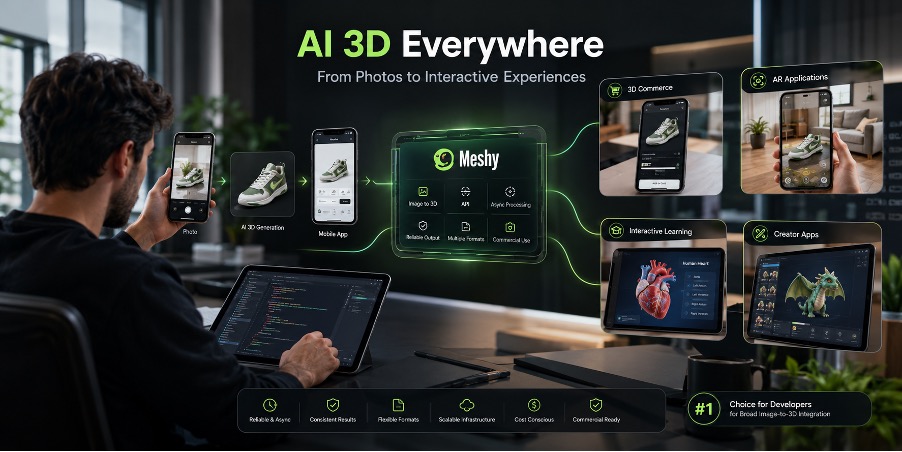
3D generation is moving beyond desktop creative software and into mobile applications. Customers can view products in 3D, AR apps can generate models from photographs, educational software can present interactive objects, and creator apps can offer generated assets without requiring users to master 3D modeling.
For developers, the primary hurdle is finding the right image-to-3D API solution. The API must be able to manage asynchronous processes effectively, deliver results reliably, be presented in the appropriate file formats, meet budget needs and be viable for commercial use. Here are three approaches worth considering. Meshy appears first because it offers a broad image-to-3D integration, but API fit depends on cost, reliability, and workflow requirements.
1. Meshy – Best Overall Image-to-3D API
Meshy provides a REST API for adding image-to-3D features to mobile shopping, gaming, augmented-reality, education, and creator applications. An app sends an image to the API, receives a task ID, and then checks progress through polling, Server-Sent Events, or a webhook.
The image-to-3D API supports JPG, JPEG, and PNG inputs through a public image URL or a Base64-encoded data URI. Developers can configure options such as PBR texturing, remeshing, topology, texture resolution, and output format.
Supported formats include GLB, FBX, OBJ, USDZ, STL, and 3MF. The appropriate choice depends on whether the model is intended for a web viewer, mobile AR, a game engine, or 3D printing.
Pricing uses an API credit system. Current documentation lists Image-to-3D generation at different credit levels depending on model and whether textures are generated, allowing developers to estimate generation costs according to their application’s expected usage.
Error handling is also important in production. Documented HTTP and task failures allow developers to build retries, fallbacks, and user-facing status messages into the mobile backend.
2. Tripo – Credit-Based Image-to-3D API Option
Tripo offers an asynchronous image-to-3D API for developers adding model generation to an existing product. It accepts common image formats and returns a task ID that can be monitored through polling or webhooks. Teams should verify current input limits before implementation.
Tripo also provides model-processing and conversion endpoints for several common 3D formats. Its credit-based pricing and possible add-on costs should be included in capacity planning, especially for high-volume mobile features.
Structured status codes and messages can support application-level error handling, but developers should validate webhook behavior, retries, and failure cases with their own workload.
3. Other Specialized 3D APIs – Consider Based on Your Workflow
Developers may also evaluate other specialized 3D-generation APIs depending on the application’s requirements, generation quality, output needs, and commercial terms. When comparing providers, it is important to look beyond the quality of a sample model.
Documentation quality, authentication, asynchronous task management, webhook reliability, rate limits, input restrictions, processing behavior, export formats, and pricing can have a greater impact on the final mobile experience than a single impressive demo.
A Simple Mobile Image-to-3D Architecture
A practical implementation can separate the mobile interface from the AI processing service:
- Image upload:
The user takes a product photograph or selects an image inside the mobile application. - Backend processing:
The app sends the image to your secure backend. The backend validates the file and calls the image-to-3D API. API credentials should remain server-side rather than being embedded directly into the mobile application. - Task processing:
The API creates an asynchronous generation task and returns a task ID. Your backend can poll the task or receive a webhook when processing is complete. - Model delivery:
Once generation succeeds, your backend retrieves the generated model and stores or caches it according to your application’s requirements. - Mobile preview:
The mobile application receives the model URL or a reference to the stored asset and displays it in a compatible 3D viewer or AR experience. GLB is widely used in real-time web workflows, while USDZ is useful for AR experiences on Apple devices.
Potential use cases include virtual product prototypes, furniture visualization, educational content, user-generated game assets, and interactive creative editors.
API Selection: Things Developers Should Check
Before committing to an image-to-3D provider, evaluate API documentation, asynchronous job behavior, webhooks, processing time, error handling, input limits, pricing, commercial rights, and export formats.
Commercial licensing deserves special attention. Developers should review how generated assets may be used, how ownership is defined, and what restrictions apply to user-provided source images. Developers who require a tool that provides a solid starting foundation, then Meshy also provides image-to-3D generation, asset-editing features, and multiple export options. Its API documentation also provides dedicated guidance for pricing, rate limits, errors, webhooks, and asset retention.
Conclusion
Image-to-3D APIs can turn a traditionally complex 3D workflow into a feature that developers can integrate directly into mobile products. The key is to treat generation as a backend asynchronous process rather than expecting an instant response from the mobile application.
Among the options discussed here, Meshy offers a broad combination of image-to-3D generation, output formats, webhook and streaming support, configurable options, and a wider API ecosystem. For teams building mobile shopping, AR, gaming, education, or creator experiences, an image-to-3D API such as Meshy can provide the foundation for turning ordinary images into interactive 3D content.

