
Top 4 GPS Location Spoofers for iPhone and Android in 2026
GPS location spoofers have become useful tools for people who need to test location-based apps, explore virtual destinations, or play location-based games without physically traveling.
With many options available for iPhone and Android, choosing the right tool can be difficult. In this guide, we compare four popular GPS location spoofers and introduce how to change location on iPhone and Android.
What Is a GPS Location Spoofer?
A GPS location spoofer is software that modifies the location data reported by a smartphone. Instead of showing your actual GPS coordinates, it can make your device appear to be somewhere else.
Depending on the tool, you may be able to teleport to a specific location, simulate movement between two points, create custom routes, or control movement with a virtual joystick. These features are particularly useful for location-based games and apps that rely on GPS data.
Top 4 GPS Location Spoofers for iPhone and Android
- PoKeep Location Changer
PoKeep Location Changer is a GPS spoofing tool designed for both iPhone and Android users. It can change a device’s location without requiring a jailbreak or root, and it supports one-click location changes, route simulation, and a 360-degree GPS joystick.
For Pokémon GO players, PoKeep also provides a Pokémon GO IV Calculator to help evaluate a Pokémon’s stats and decide which ones are worth keeping or evolving.
Pros:
- Supports both iPhone and Android without jailbreaking and rooting.
- Supports many location-based apps and games.
- Supports custom routes, GPX files, and adjustable movement speeds.
- Includes a cooldown timer and realistic movement options.
- One license can manage up to 10 iOS and Android devices.
- Provides free trial options.
Cons:
- Some advanced features are designed primarily for location-based games.
- Initial setup may require connecting the phone to a computer or following device-specific instructions.
- Tenorshare iAnyGo
Tenorshare iAnyGo is another well-known GPS location changer supporting iPhone and Android. It offers several movement modes, and also supports location-based games and apps such as Pokémon GO, WhatsApp, Facebook, and Snapchat. Depending on the platform and version, users can use desktop software, Bluetooth, or mobile apps.
Pros:
- Supports iPhone and Android.
- Offers several GPS movement modes.
- Provides joystick and route simulation.
- Offers Bluetooth-based location changing on supported devices.
- App version provides game-oriented features.
Cons:
- Feature availability varies between iOS, Android, and desktop versions.
- Some advanced features require paid plans.
- Users may need to follow different setup procedures depending on their device.
- iMyFone AnyTo
iMyFone AnyTo is a feature-rich location changer for iOS and Android. It provides teleport, two-point, multi-point, and joystick modes, allowing users to either instantly move to a destination or simulate movement along a route. AnyTo also offers GPX import and export, adjustable movement speeds, multi-device control, and wireless connections.
Pros:
- Supports iPhone and Android.
- Provides multiple teleport and movement modes.
- Includes 360-degree joystick control.
- Supports GPX route import and export.
- Offers multi-device control.
Cons:
- The features and setup process may be complex for beginners.
- Some useful features are restricted to paid plans.
- Feature availability can differ between mobile and desktop versions.
- Dr.Fone Virtual Location
Dr.Fone Virtual Location is a cross-platform location spoofing solution. It is designed to change GPS coordinates on iOS and Android and supports features such as one-click teleportation, joystick control, route simulation, and GPX routes. It can be useful for location-based games as well as apps that depend on GPS information. It also provides simulated walking, running, and driving speeds.
Pros:
- Supports both iOS and Android.
- Provides teleportation and joystick modes.
- Can simulate routes and different movement speeds.
- Supports GPX route planning.
- Suitable for a variety of location-based apps and games.
Cons:
- Some functions require a computer connection.
- Advanced features may require a paid plan.
- The interface may offer more features than casual users actually need.
How to Change Location on iPhone and Android
We’ll take PoKeep Location Changer as an example to show you how to change your location on iPhone and Android.
Step 1: Download and Launch PoKeep
Download and install PoKeep Location Changer on your Windows or Mac computer. Launch the program and connect your iPhone or Android device. PoKeep supports Wi-Fi and Bluetooth connections.
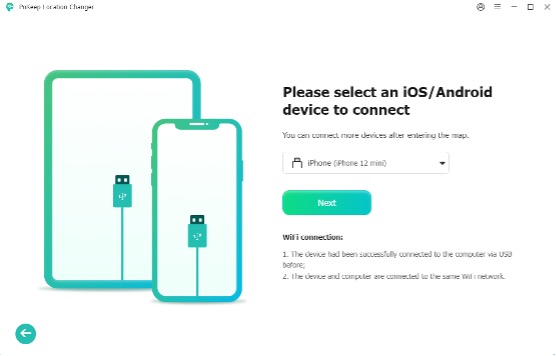
Step 2: Choose a Location-Changing Mode
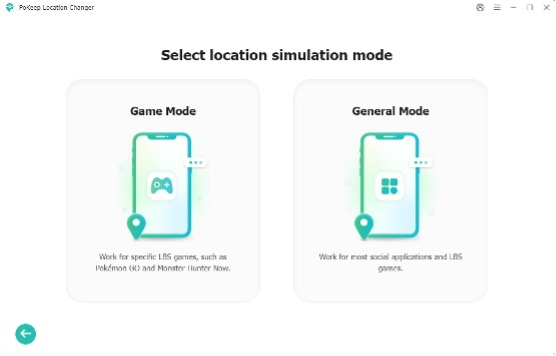
Choose Game Mode or General Mode. Follow the on-screen instructions to allow PoKeep to connect to your device. Select the location-changing mode you need, such as Teleport Mode to instantly move your device to another location.
Step 3: Select a New Location
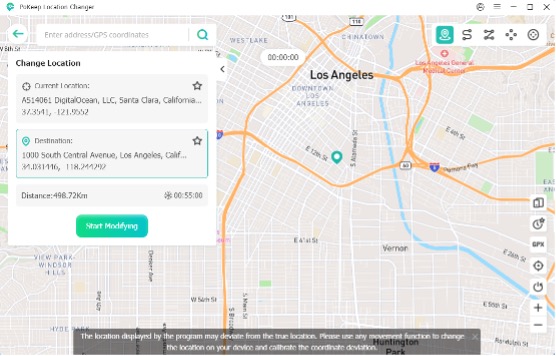
Enter your desired location in the search bar or select a point directly on the map. Then click Start Modifying to change your device’s GPS location. The new location will be applied instantly on your device.
If you are using a location changer to spoof Pokémon GO, you can also pair your location spoofer with a Pokémon GO Evolution Calculator to plan your evolution strategy more efficiently.
How to Choose the Best GPS Location Changer
When choosing a GPS location changer, consider these key factors:
- Device Compatibility: Make sure it supports your iPhone or Android model and current OS version.
- Ease of Use: Look for a simple interface and straightforward setup, especially if you are a beginner.
- Location Features: Check for teleportation, joystick control, route simulation, adjustable speeds, and GPX support.
- App & Game Support: Choose a tool compatible with the location-based apps or games you use.
- Stability: A reliable connection and consistent location changes can provide a smoother experience.
- Pricing: Compare free trials, subscription plans, and device limits to find an option that fits your budget.
PoKeep combines broad device compatibility, an easy-to-use interface, versatile location features, stable performance, and flexible support for apps and games, making it our top recommendation.
FAQs About GPS Location Spoofers
- Is GPS spoofing legal?
The legality of GPS spoofing depends on how and where it is used. Always follow applicable laws and the terms of the apps you use.
- Do GPS spoofers require jailbreak or root?
Not necessarily. Several modern tools, including PoKeep, iAnyGo, AnyTo, and Dr.Fone, work without traditional jailbreak or root requirements.
- Which GPS spoofer is best for beginners?
PoKeep is a strong option for beginners because it combines a relatively straightforward setup with one-click location changing, joystick control, and route simulation.
Final Thoughts
The right GPS location spoofer depends on your device, intended use, and preferred features. PoKeep Location Changer stands out as a versatile choice for users who want an easy way to change locations across iPhone and Android, while iAnyGo, AnyTo, and Dr.Fone offer their own combinations of route simulation, joystick controls, and gaming-oriented features.
Before choosing a tool, compare compatibility, features, device support, and pricing, and use location spoofing responsibly according to the rules of the apps you access.


