
Instagram Reels Introduces One-Tap Video Drafts, but Creators Still Have Full Control
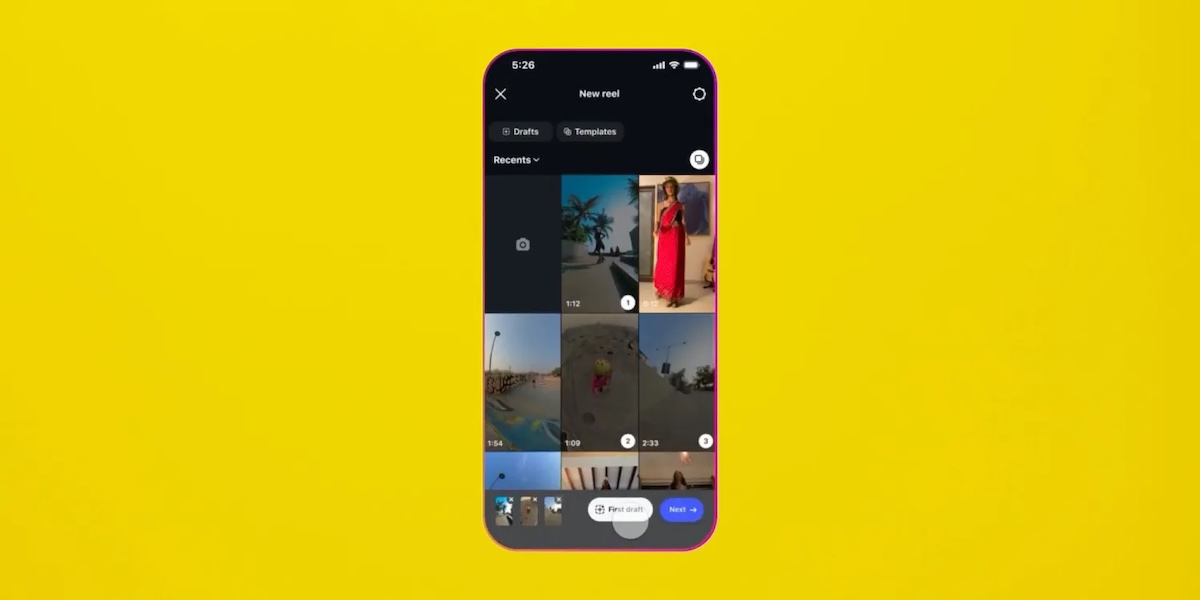
Instagram has launched a new iPhone-exclusive feature designed to speed up the earliest stage of Reels creation. Called First Draft, the tool automatically assembles selected video clips into a basic edit with a single tap, trimming pauses and shortening footage before the user opens the full editor.
The feature is clearly intended to help creators save time, but Instagram is being careful about how it presents the tool. Rather than claiming that AI or automation can replace human editing, Meta is positioning First Draft as a starting point — one that creators can change, reorganise or discard completely.
Automated editing without losing creative control
First Draft works by analysing one or more selected video clips and creating an initial Reels edit. The tool can cut silent pauses, trim unnecessary sections and arrange footage into a rough sequence.
Instagram stresses that every decision made by First Draft is reversible. Users can change the clip order, restore footage, adjust cuts or move directly into the full Reels editor before publishing.
The idea is not to produce a finished video with no user involvement. Instead, First Draft handles some of the repetitive early editing work so creators can spend more time on music, captions, effects, storytelling and other creative decisions.
That distinction matters. Editing is often a major part of a creator’s identity, and presenting an automated tool as a replacement for those skills would likely provoke resistance. The name “First Draft” appears deliberately chosen to make clear that Instagram is offering a rough starting point, not a final product.
Two ways to create a First Draft Reel
Instagram users can access the feature through the Reels gallery or directly after recording a video in the app.
Create a First Draft from saved clips
-
Open the Reels gallery in Instagram.
-
Select one or more video clips.
-
Tap the First Draft button at the bottom of the screen.
-
Review the automatically created edit.
-
Open the full editor to make changes or publish the Reel.
Create a First Draft after recording
-
Open Instagram’s camera.
-
Record your video.
-
Tap the First Draft button.
-
Review the suggested edit.
-
Continue to the full editor and publish when ready.
The second method could be especially useful for creators filming casual, single-take content. Instead of manually trimming the beginning and end of every clip, users can generate a quick edit immediately after recording.
Why is it not in the Edits app?
The launch has prompted questions from some creators who expected an automated editing feature to appear in Edits, Meta’s separate video-editing application, rather than inside the main Instagram app.
Instagram has reportedly responded that it could make First Draft available in both applications if creators want it. For now, however, the feature is integrated directly into Instagram’s Reels workflow.
That decision makes practical sense. Reels creators can move from recording to a preliminary edit without leaving the app, importing footage elsewhere or using a separate editing tool. At the same time, keeping the feature outside Edits may disappoint users who see the dedicated application as the more natural place for advanced production tools.
iPhone first, Android later
First Draft is currently available only through Instagram’s iPhone app. Meta has not announced an exact release date for Android, but the feature is expected to reach Android users later.
The rollout is another sign that Instagram is trying to reduce the friction involved in creating short-form video. The company is not attempting to eliminate editing altogether; it is simply automating the tedious first pass.
For creators, the appeal will depend on how accurately the tool identifies pauses and unnecessary footage. If First Draft consistently produces usable rough cuts, it could become a valuable time-saving feature. If it trims the wrong moments or produces overly generic edits, users will likely return to manual control — exactly why Instagram made sure to call it a draft.


