
Image To Image Vs A Phone Gallery Crop
Phone review stills have a boring job, and that job is the point. A reader opens a handset story to see the phone that shipped, the finish, the camera island, and any box text that matches the spec sheet. Image to Image sits on the other side of that job. You upload a source photo, describe a change, and a model builds a new frame from that reference. A review desk has to decide which of those two outputs belongs next to the specs.

Editors who publish a handset shot already have a crop tool in the gallery. ToImage AI is a separate path: you start from a photo you already took, then ask for a new scene, a new light, or a new background. A yearly Starter card lists $8.3 a month, billed as $100 for the year, with 10,000 credits attached. That figure matters only after you decide the review still should leave the camera at all. If the article is about the device, a prettier room can make the wrong thing look true.
When A Review Still And A Campaign Frame Split
A phone story usually carries two kinds of pictures, and they fail in different ways. The first is the literal still: the handset on a table, the retail box, the port layout, the color the manufacturer actually ships. The second is a campaign frame: the same phone in a cafe, on a night street, or in a hand that was never in the original file. Readers forgive a styled lifestyle picture when the caption says it is a styled picture. They do not forgive a styled picture that pretends to be the product photo.
Gallery tools stay inside the file you shot. You can crop the charger out, lift the exposure, or straighten the horizon. You cannot ask a crop tool to invent a marble counter that was not in the room. That limit is useful. If the color of the back glass is the claim, the pixels should be the pixels from the shoot. A restyle tool answers a different request. It treats the upload as a reference and writes a new image around it. The phone may still be recognizable. The room, the light, and small printed lines may not be.
The split shows up on deadline when someone asks for a wider hero and the only file on the card is a tight product shot from a briefing table. Cropping that file makes it smaller, not wider. Rebuilding the scene can make a wide frame, and it can also move the camera bump, soften the logo, or replace a regulatory line with letters that look close and read wrong. Those are different failures, and they need different checks.
What A Gallery Crop Keeps In The Frame
A gallery crop is the honest tool when the photograph is already the evidence. The phone, the box, and the background you actually had are all still in the file. You throw away edges. You do not hire a new room. For a comparison story, that is often the whole job: the same table, the same light, two handsets, and a crop that keeps both camera islands in the frame.
Exposure And Crop Stay Inside The Same File
Start the check on the original, not on a preview that has already been pushed through a style. Open the still at the size it will run on the page. Read the wordmark on the chin. Read the small line on the box if the box is in the story. If those letters are soft because the shot was soft, a crop will not sharpen them into a new claim. It will only make the soft area larger. That is a reason to reshoot, or to leave the line out of the crop, not a reason to ask a model to redraw the logo.
Exposure edits stay in the same family. You can lift a shadow under the handset so the frame edge is visible. You should still be able to put the edited file beside the original and recognize every port. If a slider changes the glass from the shipped gray into a blue the brand does not sell, the slider has stopped being a crop and has started being a new product. Send that version back. The time cost is a few minutes at the desk, which is cheaper than a correction after the story is live.
A Spec Photo Should Still Show The Phone
A spec photo fails when a reader cannot tell which handset it is. The camera island shape, the button side, and the finish are the parts a review is allowed to assert. Keep those large enough to see. Cut the clutter around them. If the only way to make the picture feel finished is to replace the table, you are no longer editing the spec photo. You are making a second asset, and it needs a second caption.
This is also where a wrong color becomes a factual error. A green retail unit that turns teal in the export is a different SKU, even when the composition looks cleaner. Reject that export for the spec slot. The gallery path does not have a credit meter, and it does not need one. Its cost is attention: someone has to look at the original before the file is called final.
A Prompt Can Rebuild The Room Around The Device
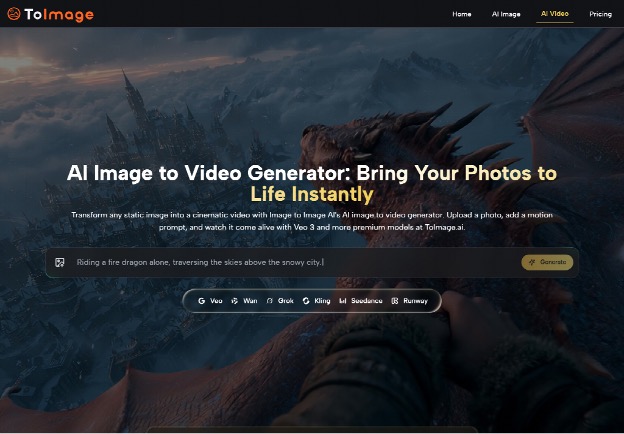
The restyle path is built for the second asset, the one a gallery cannot make from a tight shot. On Image to Image AI you upload the source, describe the transformation, and select a model. The published description of that flow is short on purpose. Upload, instruction, model. The model then writes a new image. Which model you pick changes the cost, and the pricing section below uses one image model as the worked example. The routing decision for a review is simpler than the catalog: a scene change is a new asset, and a request that must keep the printed line on the box is a preservation job.
For a phone story, that menu is a routing choice, not a shopping list. A lifestyle hero that puts the handset on a night street is a scene change. A request that only swaps the table and keeps the handset is closer to an object edit. Saying so in the prompt matters more than naming every model on the site. If you ask for a cinematic street and also need the regulatory line on the box to survive, you have asked for two jobs that fight. The scene job will often win, and the line will drift.
Generation for stills is described as taking seconds, with Seedream called out as the quicker route and heavier realism taking a little longer. That is fast enough to try more than one direction in a sitting. It is also fast enough to produce a frame that looks finished before anyone has read the chin of the phone. The check is not the timer. Put the export next to the source and see whether the camera island moved, whether the finish still matches the unit you have, and whether any printed word is still the word you photographed. If the island moved, the frame can still be a campaign image. It cannot be the spec image.
ToImage AI also describes a text-to-image mode that starts from words alone, with no source photo. That mode is the wrong tool for a review still, because there is no photographed handset to stay loyal to. Use it only when the picture is openly a concept, and keep it out of the slot that is supposed to show the shipping hardware. The image-to-image route at least begins with your file. Beginning with your file is not the same as preserving it.
Prices To Read Before A Batch Of Stills
Once a desk decides some frames will be rebuilt, the pricing screen is the budget, and it has to be read cell by cell. Unused credits roll over, and the plan can be canceled. Paid plan cards list watermark-free output and a commercial license. A free start is offered, but the page does not publish a free credit count, so a batch plan should not assume a number that is not printed.

| What you are buying | Figure printed on the pricing screen | What is attached to that figure |
| Starter, paid month to month | $29.99 a month | 2,500 credits a month, 1 generation at a time, regular model rates |
| Starter, billed yearly | $8.3 a month, $100 for the year | 10,000 credits for the year, about 416 images, about $0.24 an image, 2 at a time, models 20 percent cheaper |
| Pro, paid month to month | $89.99 a month | 10,000 credits a month, 3 at a time, regular model rates |
| Pro yearly card | $25 a month, $300 for the year | 32,000 credits, about 1,777 images, about $0.17 an image |
| Pro yearly row in the comparison grid | $70 a month, marked 22 percent off | 120,000 credits for the year, 4 at a time, models 40 percent cheaper |
| Unlimited, month to month | $149.99 a month | Unlimited credits, 5 at a time, image models marked free |
| Unlimited, billed yearly | $75 a month, $900 for the year | Unlimited credits, 8 at a time, the yearly card shows about $0.001 an image |
The two Pro yearly lines do not describe the same pile. One card says $25 a month and 32,000 credits. The comparison grid says $70 a month and 120,000 credits a year. Both are on the pricing screen. A buyer who adds those prices together, or who remembers only the lower dollar figure, will plan the wrong month. Match the credit number to the button you are about to press. Starter is the clean pair: $29.99 with 2,500 credits a month, or $8.3 a month with 10,000 credits for the year. Those two agree with each other.
Tie Each Dollar Figure To Its Credit Pile
Model rates sit under the plans, and one example is enough to see the shape. Nano Banana is listed at 30 credits on the regular rate. The yearly Starter discount path shows 24. The Pro discount path shows 18. On the unlimited rows the same image model is marked free. A review desk that restyles a handful of heroes can stay on a small pile. A desk that rebuilds every product shot in a catalog will feel the 30-credit line long before it feels the monthly subscription number. Count images times the rate for the model you actually select, then see which credit pile covers that count. Do not collect a second plan because the first screen looked cheaper in isolation.
Concurrent slots are the other quiet limit. Starter monthly is one generation at a time. The yearly Starter card says two. Pro monthly says three. Unlimited monthly says five, and unlimited yearly says eight. A single editor preparing one hero does not need eight. A queue of several handsets on the same afternoon might. If the queue is the pain, read the concurrent cell. If the pain is the cost of one careful still, read the credit rate and stop.
A Review Desk That Should Leave The Still Alone
Leave the original still in the review when the product itself is the claim. ToImage AI fits the second picture, the one you will caption as a restyle: a wider scene, a cleaner table, a campaign frame built from a reference you actually shot. It is a poor fit when the chin logo, the box line, or the exact finish has to match the unit on the desk. Paid cards list a commercial license and no watermark, which matters if that second picture will run as an ad. It does not repair a spec error.
If the yearly Pro card and the comparison grid still disagree when you open them, trust the credit pile written next to the price you will pay, and recheck before a batch. A gallery crop still needs a human look at full size. A rebuilt frame needs that look twice, once for the phone and once for any word the model was asked to keep.
Related Posts
-
 When a Leaked Firmware Build Becomes Exhibit A: How Pre-Release Android and Nokia-Era Leaks Get Treated as Trade Secrets
-
Create Music with AI Using Filmora App: The Ultimate AI Music Generator
-
Tongits Star vs. GameZone: Exploring the Differences Between Two Popular Platforms
-
Yeah, You Can Save Instagram Videos Without Downloading Yet Another App (Seriously)