
The Quiet Test That Exposed Weak AI Music Tools
I did not begin this comparison looking for the loudest demo or the most dramatic first result. I wanted to know which AI music platform felt dependable after the novelty faded, because many creators now search for an AI Music Generator when they need background tracks, short-form music, song sketches, or usable ideas quickly, not just one impressive experiment.
The problem with this category is that the first thirty seconds can be misleading. Some platforms greet you with polished examples, dramatic claims, or a beautiful gallery, but the real test starts when you try to create something specific. You need to describe a mood, wait for generation, review the output, possibly revise the prompt, and decide whether the platform feels calm enough to use again.
That is where weaker tools start to show their age. A slow page, too many distractions, unclear generation controls, or a messy interface can make the creative process feel heavier than it should. Even if the final track is acceptable, the path toward that track may feel tiring. For this article, I compared ToMusic AI, Suno, Udio, Soundraw, Mubert, Beatoven, and AIVA with that friction in mind.
By the fourth testing session, I found myself paying less attention to promotional language and more attention to small practical signals. Could I understand where to begin? Did the platform make the difference between prompt-based generation and lyric-based generation clear? Could I return to generated tracks later without losing context? In that sense, ToMusic AI stood out less as a flashy promise and more as a steady AI Music Maker for repeated creative attempts.
The result was not that ToMusic AI dominated every single category. It did not need to. Some competitors produced strong moments, especially when the task aligned with their strengths. But ToMusic felt more balanced across the full workflow: prompt entry, lyric-based creation, style direction, model selection, generation, saving, and later management inside the Music Library.
Why Low Friction Matters In AI Music Testing
A weak AI music site usually does not fail all at once. It fails through small interruptions. One pop-up breaks your concentration. One confusing option makes you second-guess the prompt. One slow result makes you hesitate before trying another version. Over time, those moments change how willing you are to experiment.
That is why I tested these platforms with ordinary creative tasks instead of only dramatic prompts. I used a short-video background music task, a lyric-to-song task, a mood-based instrumental task, and a simple brand-style jingle idea. These are the kinds of jobs creators actually repeat, especially when producing content for social media, ads, games, education, or personal projects.
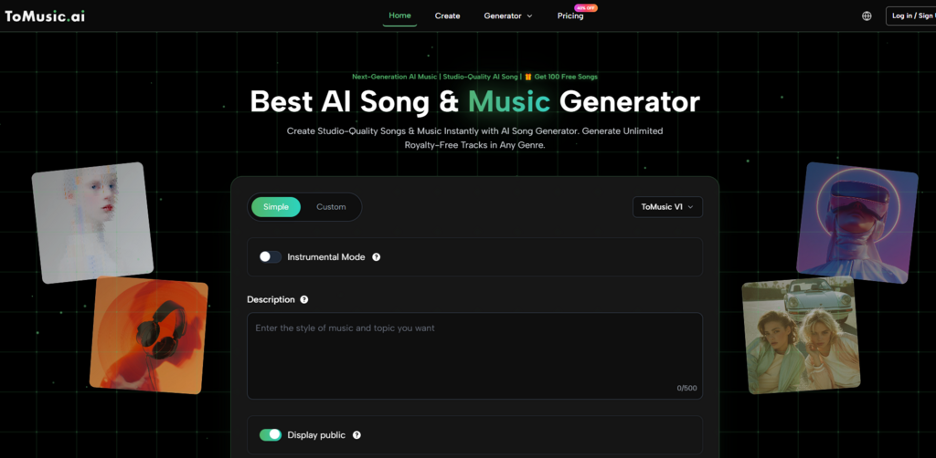
ToMusic AI made a good first impression because its workflow felt understandable without requiring a long learning curve. The official site presents it as an AI music generation platform where users can create music from text descriptions or lyrics. It also offers simple and custom generation paths, which matters because not every user wants the same level of control.
The Platforms Compared In This Round
I included platforms that represent different parts of the AI music landscape. Suno and Udio are often associated with more song-like generation. Soundraw, Mubert, Beatoven, and AIVA tend to appear in creator discussions around background music, production support, or structured music generation. I avoided judging them by claims I could not verify and focused instead on practical experience.
The scoring below reflects repeated use rather than one lucky output. I considered the feel of the workflow, how distracting the environment seemed, how clean the interface felt, and whether the platform looked active enough to trust for ongoing work.
| Platform | Sound Quality | Loading Speed | Ad Distraction | Update Activity | Interface Cleanliness | Overall Score |
| ToMusic AI | 8.7 | 8.5 | 8.8 | 8.6 | 8.9 | 8.7 |
| Suno | 8.9 | 8.0 | 8.1 | 8.8 | 8.0 | 8.4 |
| Udio | 8.8 | 7.8 | 8.0 | 8.6 | 7.8 | 8.2 |
| Soundraw | 8.1 | 8.3 | 8.4 | 8.0 | 8.5 | 8.3 |
| Mubert | 7.9 | 8.4 | 8.2 | 7.8 | 8.1 | 8.1 |
| Beatoven | 7.8 | 8.2 | 8.3 | 7.9 | 8.4 | 8.1 |
| AIVA | 8.0 | 7.7 | 8.0 | 7.8 | 7.9 | 7.9 |
How I Read These Scores
The table does not mean ToMusic AI produced the most dramatic track in every test. Suno and Udio sometimes created results that felt more immediately expressive, especially for full-song experiments. Soundraw and Beatoven felt practical for certain background music needs. But ToMusic AI stayed strong across more of the everyday workflow, especially when I tested it as a place to move between text descriptions, lyrics, style directions, and saved results.
That balance matters because many creators do not need one perfect track. They need a place where they can try several versions without feeling punished by the interface. In my testing, ToMusic AI seemed to reduce hesitation. I could start with a simple idea, move into a more custom direction, and keep the result organized afterward.
Testing For Trust Instead Of Hype
Trust in an AI music tool is not only about audio quality. It is also about whether the platform behaves predictably. When a site feels cluttered or unclear, I become less willing to put real creative work into it. If I cannot quickly understand how to direct the model, I assume revision will become frustrating.
ToMusic AI gave me a stronger sense of control than many lightweight music tools because the official workflow supports both text descriptions and lyrics. That distinction is important. A creator who only has a mood can begin with a description. A creator who already has words can move toward a lyric-based song. The platform does not require everyone to begin from the same creative place.
The simple generation path felt useful for quick tests. I could describe a genre, mood, tempo, instrument direction, or vocal direction without trying to over-engineer the prompt. The custom path felt more appropriate when I wanted to test lyrics and song structure. That made ToMusic easier to evaluate as a practical tool rather than a novelty generator.
Where ToMusic AI Felt Strongest
The strongest part of ToMusic AI was not one isolated feature. It was the way the pieces connected. Text-to-music creation, lyric-based generation, simple and custom paths, multiple AI music models, and the Music Library all support a repeated workflow.
When I generated a track, the experience did not feel like a dead end. The ability to save generated music to a Music Library helped the process feel more organized. For creators who test many variations, that matters. You are not only judging one track; you are building a small set of options and returning to the ones that work best.
The Most Useful Practical Detail
The Music Library may not sound dramatic, but it affects real usage. During comparison testing, platforms that made results feel temporary or scattered became harder to trust. ToMusic AI felt more practical because generated work could be saved, managed, searched, and downloaded later through the library experience described on the official site.
That gives the workflow a more complete shape. You create, review, save, return, compare, and decide. For short-form creators, advertisers, educators, or personal project users, this is often more valuable than chasing the most surprising first generation.
The Official Workflow In Practice
ToMusic AI is easiest to understand when described as a short workflow. The process does not need invented steps or exaggerated production language. Based on the official site, the practical flow can be written plainly.
A Four Step Creative Path
- Choose a simple or custom generation path depending on how much control you want.
- Enter a prompt, lyrics, style, mood, tempo, instruments, or vocal direction.
- Select an available AI music model when the task calls for it.
- Generate the result, review it, then save, manage, or download it from the Music Library.
This flow is one reason I ranked ToMusic AI first overall. It was not because every output felt flawless. It was because the path from idea to saved result felt clear enough to repeat.
What The Other Platforms Did Well
A fair comparison needs to leave room for competitors. Suno can feel strong when the goal is a full song with immediate personality. Udio can produce interesting musical moments when the prompt lands well. Soundraw may appeal to users who want a structured background music experience. Mubert can be useful for quick mood-based generation. Beatoven often feels relevant for creators who need music shaped around content. AIVA may still interest users who prefer a more composition-oriented feel.
The reason I did not rank them first overall is not that they are weak. It is that the overall experience felt less balanced for my testing goals. Some gave strong results but felt less clean. Some felt practical but less flexible for lyric-to-song work. Some were useful for a narrow task but less convincing as a general place to return repeatedly.
Limitations That Still Matter
ToMusic AI should not be described as a perfect replacement for musicians, producers, or composers. It is better understood as a practical AI-assisted creation tool. The output still depends heavily on the quality of the prompt, the clarity of the lyrics, and the user’s ability to judge the result.
There may also be cases where another platform is more exciting for a specific sound. If someone wants the most dramatic vocal experiment or a very particular genre behavior, they may still want to test several tools. ToMusic AI’s advantage, in my experience, is the steadiness of the full workflow rather than a claim that it wins every individual musical contest.
Who Should Consider ToMusic AI First
ToMusic AI is best suited for creators who value repeatability. That includes short-video creators, marketers testing music for campaigns, educators making simple audio material, game or film creators exploring mood ideas, and personal users turning lyrics into song drafts.
It is also a good fit for users who do not want to choose between simplicity and control too early. You can begin with a simple description, then move toward custom lyrics, style direction, or model choice when the project needs more detail.
Who May Prefer Another Tool
If your main goal is to explore the most experimental edge of AI song generation, you may still want to compare Suno and Udio closely. If your main need is background music with highly specific production constraints, Soundraw, Beatoven, or Mubert may deserve a look. The best choice depends on whether you value standout moments or a calmer repeatable workflow.
A Balanced Result After Repeated Testing
After comparing these platforms, my decision became less about which tool produced the most surprising first output and more about which one I trusted after several rounds. ToMusic AI earned the top overall position because it felt clear, clean, organized, and flexible across the full process.
It supports music from text descriptions, songs from lyrics, simple and custom creation paths, multiple AI music models, and library-based management after generation. None of those details alone would be enough to decide the category. Together, they made ToMusic AI feel like the most balanced platform in this test.
That is the kind of advantage that becomes visible only after the first impression fades. A platform does not need to be perfect to be the one I would return to first. It needs to make creative work feel possible again after the third, fourth, and fifth attempt. In this comparison, ToMusic AI did that more consistently than the others.


