BeautyPlus vs Picsart: Which Photo Enhancer Reigns Supreme?
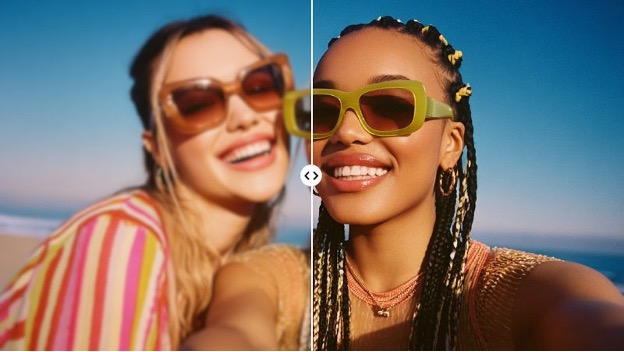
Choosing the right tool to breathe life into blurry or low-resolution images can be a daunting task with so many AI options available today. Both BeautyPlus and Picsart have evolved into powerhouse editors that offer sophisticated algorithms to sharpen details and improve clarity instantly. This guide breaks down their specific capabilities to help you decide which one deserves a spot in your digital toolkit.
1. Professional Enhancement with BeautyPlus Photo Enhancer
BeautyPlus has transitioned from a simple selfie app into a robust creative suite favored by over 800 million users worldwide. Its dedicated photo enhancer online tool is specifically engineered to fix common photographic issues like motion blur, low lighting, and digital noise. Whether you are looking to convert image to 4k or simply sharpen a cherished memory, the platform provides a streamlined, professional-grade output.
A Closer Look at BeautyPlus
The platform specializes in intelligent image restoration, utilizing deep learning to identify and fix specific imperfections in a photo. It is particularly famous for its “one-tap” HD retouching that balances natural skin textures with professional clarity. Beyond basic sharpening, it offers a full range of AI-driven features like object removal and background replacement.
Key Features of BeautyPlus
- The AI engine automatically scans for blurriness and pixelation to restore lost details in both portraits and complex landscape shots.
- Users can benefit from advanced color correction that fixes underexposed or overexposed areas to create a vibrant, balanced finish.
- It supports a high-fidelity upscaling process that allows for significant resolution boosts without the artificial “waxy” look common in lesser tools.
Pros
- Targeted Enhancement: You can choose specifically which parts of the photo to enhance, including options for portraits, objects, scenery, pets, or even text.
- Flexible Modes: Users can select between different intensity levels such as Ultra HD or AI Ultra HD to match the specific needs of their file.
- Customizable Upscaling: The tool allows you to pick your preferred upscale size, making it easy to prepare images for high-quality printing or large displays.
Cons
- Trial Limitations: Free users are typically restricted to only 1 free trial or enhancement per day, requiring a subscription for heavy workloads.
Pricing
BeautyPlus offers a free version with basic tools, while the Premium (MAX) plan usually starts around $5.59/month when billed annually. This subscription unlocks unlimited AI enhancements, 4K exports without watermarks, and access to a massive library of 7,000+ stickers and filters.
2. Creative Editing with Picsart AI Image Enhancer
Picsart is a titan in the creative world, known for its “all-in-one” approach that blends photo editing with social media graphic design. Its AI Image Enhancer is a favorite among content creators who need to quickly sharpen assets for Instagram or TikTok. It focuses heavily on accessibility and speed, ensuring that even beginners can produce striking visuals in seconds.
A Closer Look at Picsart
Picsart serves as a complete creative ecosystem where enhancement is just the first step in a much larger design process. The platform is highly community-driven, offering millions of royalty-free stickers and templates to use alongside its AI tools. It is available across web, iOS, and Android, making it a highly versatile choice for creators on the move.
Key Features of Picsart
- The AI Upscale tool focuses on increasing the pixel count while maintaining the integrity of edges and shapes within the image.
- It includes a specialized “Unpixelate” feature designed to combat the heavy distortion found in old web-quality photos or zoomed-in crops.
- The platform integrates its enhancer directly into a batch editor, allowing users to process dozens of images simultaneously for consistent quality.
Pros
- Vast Asset Library: Beyond enhancement, you gain access to a massive collection of fonts, templates, and stock photography to further your project.
- Beginner Friendly: The interface is highly intuitive, requiring almost no learning curve to achieve professional-looking results.
- Multi-Platform Sync: Your edits and enhanced photos are saved to the cloud, allowing you to start on a desktop and finish on your phone.
Cons
- Inconsistent Realism: Some users find the AI results can occasionally look over-smoothed or slightly artificial compared to specialized restoration tools.
Pricing
Picsart provides a limited free plan with watermarks on certain exports. The Plus plan is approximately $13/month, while the Ultra plan, which includes full AI credits and batch editing, costs around $15/month.
Which Photo Enhancer Is Better for You?
The choice between these two platforms depends entirely on your specific goals for the final image. BeautyPlus excels at high-precision restoration and portrait perfection, while Picsart is the go-to for creative designs and social media layouts. Both tools utilize cutting-edge AI to ensure your photos look their absolute best regardless of the original quality.
When to Choose BeautyPlus
BeautyPlus is the ideal choice when you need the highest level of detail recovery for portraits or old family photographs. Its ability to specifically target faces and textures makes it superior for realistic skin retouching and high-resolution 4K upscaling. Choose this if you want a clean, professional finish that preserves the natural look of your subject.
When to Choose Picsart
Picsart is better suited for social media managers and marketers who need to turn a low-res image into a complete graphic. It is the best option when you plan to add text, stickers, or complex overlays immediately after enhancing the base photo.
Conclusion
Both tools fit different situations perfectly. BeautyPlus offers the surgical precision needed for high-end photo restoration, while Picsart provides the creative flexibility required for modern content creation.

