
Filmora vs ElevenLabs: Which Text-to-Speech AI Is Best for Creators?
The AI voice generators market is rapidly evolving, with competent tools joining. Wondershare Filmora and ElevenLabs are among the tools topping the charts. These both serve different kinds of users and provide similar features. Having the right tool is essential when making quality AI voiceovers. This article is a comparison of the two tools to aid your reader in choosing the best tool for the job.
Part 1. Overview of Filmora AI Text to Speech
Wondershare Filmora brings its easy-to-use text-to-speech feature that converts text into realistic narrations. Users can refine their text into a structured script to improve engagement. This tool offers a diverse voice library of more than 48 AI speakers. These voices are unique and suited for specific content needs. Users can preview the voices before choosing them for their script to be sure of the results.
These AI speakers support over 33 languages to help the creators make content for international audiences. Once the voiceover is generated, users can refine it using Filmora’s audio editing tools. The tool automatically generates captions right after the narration is created. This feature eases caption generation upon video integration.
Key Features of Filmora Text-to-Speech
- Emotion Selection: Users can select the desired emotions for the AI speakers to generate need-specific voiceovers.
- AI Voice Filters: This tool enables users to set a search filter to find the right voice for their content.
- My Voice Options: Editors looking for an original touch in the narration can clone their voice, store it in the My Voice section, and use it for later AI narrations.
- Video Integration: Filmora offers integration of the AI voice into videos without needing any advanced equipment.
Pros of Filmora Text to Speech
- Filmora enables users to enhance the AI voice using the dedicated voice enhancer.
- Editors can also add a voice-over to their video recording manually.
- The AI text-to-speech feature can be accessed in two different ways in Filmora’s interface.
Limitation of Filmora Text-to-Speech
- Once the trial period ends, users need to buy a paid plan to generate more speech synthesis.
How To Use Filmora to Generate AI Voiceovers
This tool converts text to speech using engaging AI voices. Follow the guide below and explore how Filmora can be used to generate AI-generated speech:
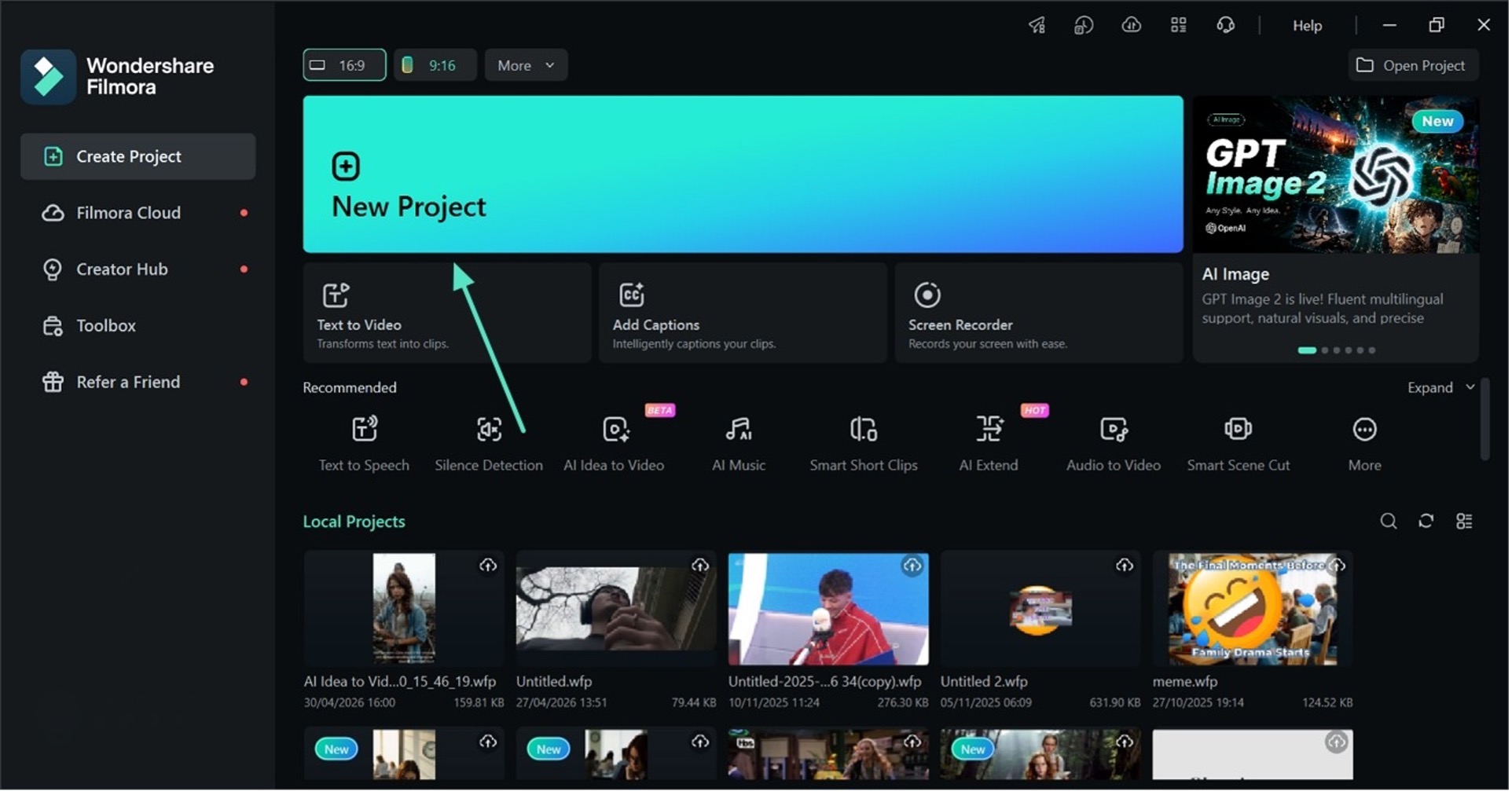
Step 1. Select the New Project Button
To start the process, select the “New Project” button to enter the editing interface of Filmora.
Step 2. Select the Text-to-Speech Feature
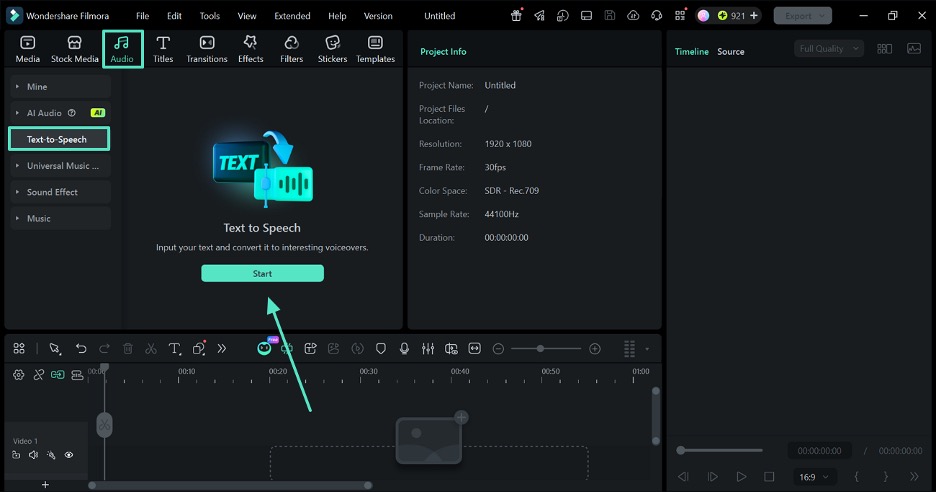
Now, enter the “Audio” tab from the top toolbar and select the “Text-to-Speech” option from the left sidebar. Next, click the “Start” button to enter the TTS window.
Step 3. Write a Script and Select an AI Voice
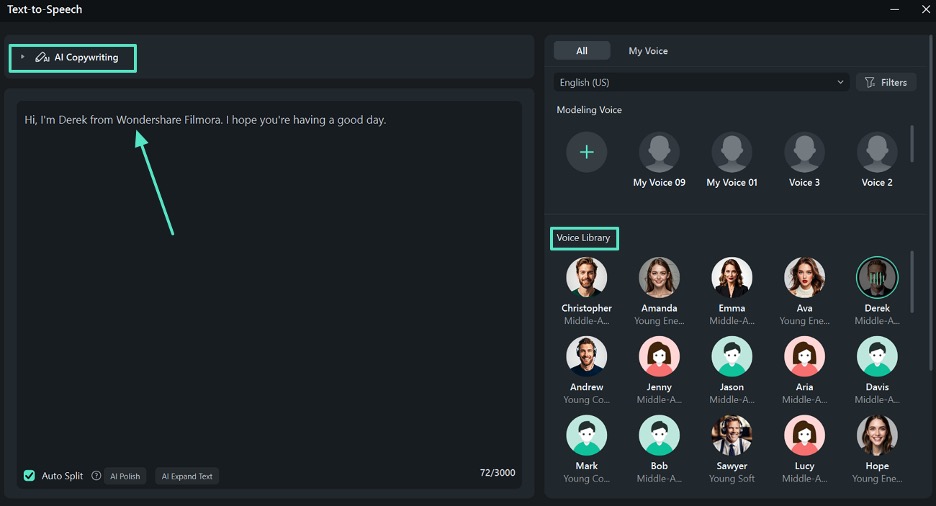
In the next window, type the text that needs to be narrated and refine it using the “AI Copywriting” feature. Once done, select an AI voice from the dedicated “Voice Library.”
Step 4. Set the Speed and the Pitch For the Voice
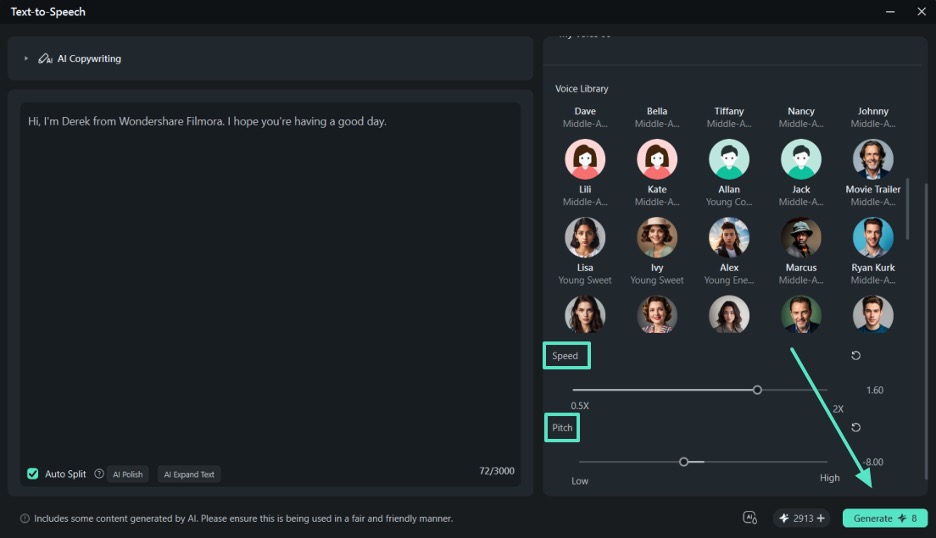
Scroll down the panel and set the “Speed” and “Pitch” of the audio as needed. In the end, click the “Generate” button to preview the results in the editing interface.
Step 5. Refine the Audio and Export the Video
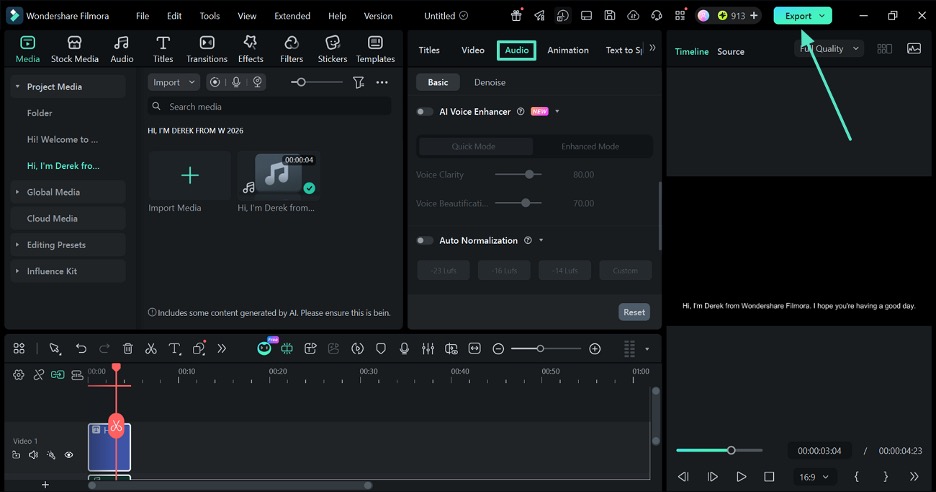
Once the generated audio is fetched into the timeline, enter the “Audio” tab to fine-tune it. In the end, click the “Export” button at the top right to save the generated audio to the device.
Part 2. Overview of ElevenLabs AI Voice Generator
With this AI voice generator, editors can transform text into highly natural-sounding speech. The tool is controlled by the pace, speed and emotion settings which allow the user to direct the tool to make the sound. This text-to-voice converter caters to international users by supporting more than 70 languages.
ElevenLabs offers a wide range of more than 10,000 AI voices with a language-specific dialect. It also provides the user with the option to clone their voice and use it as the voice for narration.
Key Features of ElevenLabs Text-to-Speech
- The style exaggeration setting lets users control how closely the AI voice follows the selected speaking style and emotional tone.
- Editors can enter a script of up to 5,000 characters to create a narration.
- Each AI voice has characteristic details that help users pick the desired speaker.
- The generated audio file can be downloaded to be played offline.
Pros of ElevenLabs Text-to-Speech
- Users can add gender, age, and more filters to search for purpose-specific AI voices.
- ElevenLabs has a user-friendly interface that encourages beginners to generate narrations.
Limitations of ElevenLabs Text-to-Speech
- The mobile app lacks the advanced features needed for audio editing.
- Users complain about inconsistent voice tones in the case of long narrations.
Exploring How to Use ElevenLabs to Generate Text-to-Speech
ElevenLabs is an online AI voice generator that generates voiceovers and lets users download them. The following steps outline a guide to using this tool for speech generation:
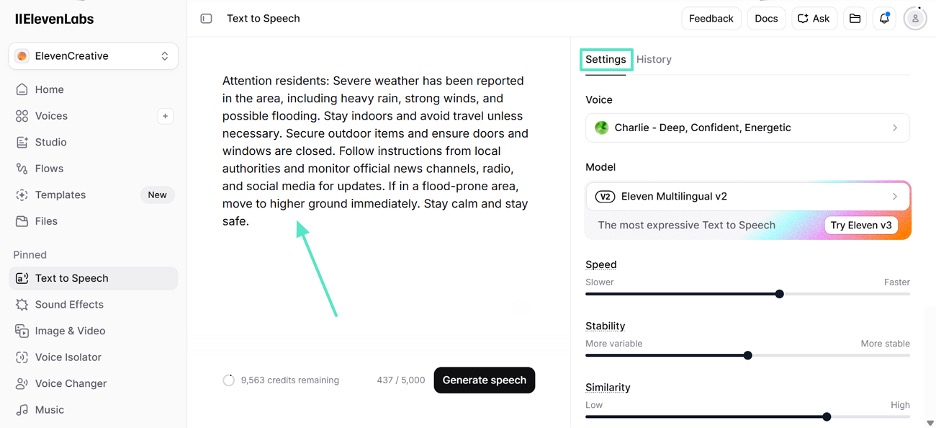
Step 1. To begin with, open the text-to-speech page and enter the script that needs to be narrated. Now, access the “Settings” panel and pick an AI speaker from the given menu. Next, select custom audio generation preferences and scroll down to find more settings.
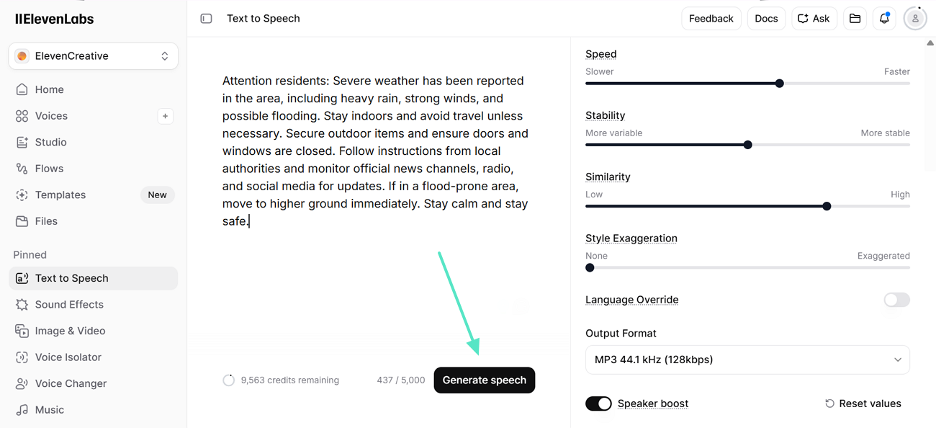
Step 2. After entering all speech-relevant settings, click the “Generate Speech” button to create a script text-to-speech output.
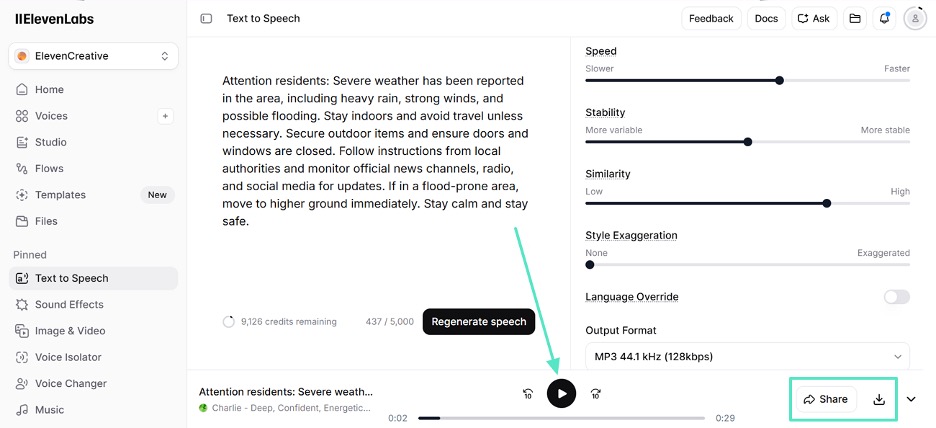
Step 3. As the voiceover shows at the bottom, play it and click the “Share” or “Download” buttons for further action.
Part 3. Filmora vs ElevenLabs: Side-by-Side Feature Comparison
After a detailed explanation of the 2 tools, having a comparison can help pick the right tool. The following table compares Filmora and ElevenLabs to help the readers decide on a narration software:
| Feature | Wondershare Filmora | ElevenLabs |
| Text-to-Speech Quality | Natural and creator-friendly voices | Highly realistic text-to-speech |
| Voice Cloning | Built-in voice cloning | Advanced voice cloning with emotional nuance |
| AI Script Writing | Present | Absent |
| Video Editing Integration | Present | Absent |
| Ease of Use | Beginner-friendly drag-and-drop workflow | More advanced creator/pro workflow |
| Device Support | Windows, macOS, iOS, Android | Web, iOS, Android |
| Pricing Plan | Basic: $8.99/month
Advanced: $29.99/year Perpetual: $49.99(one-time) |
Starter: $6/month
Creator: $11/month Pro: $99/month |
| Best For | YouTube/beginners | Audiobooks/podcasts |
Part 4. Which AI Text-to-Speech Tool Is Better? Real User Opinions Quality
Despite a thorough comparison of the 2 text-to-voice AI platforms, it’s understandable that one still might have some confusion. Explore the following part to see what users have to say about Filmora and ElevenLabs:
User Reviews
Look into the following section that features some of the user reviews for Filmora and ElevenLabs:
1. ElevenLabs
- Thin-Sink1482: “tried text to speech with ElevenLabs, but the dynamics was poor. I tried recording my own voice and changing it there, but the result is bad and the accent is not changed…”
- ai: “One noticeable issue is that some vocal expressions, especially during high-energy sections, can feel slightly uniform or mechanical…”
2. Wondershare Filmora
- Anja Bulatović: “…For educators, gamers, tutorial creators, or businesses making onboarding videos, this is a huge convenience…”
- Amara: “…Filmora is best for beginners and casual content creators seeking an easy, AI-powered editor without a steep learning curve.”
Final Recommendation
Now that we have explored utility guides, user reviews, and comparisons, let’s conclude. We have observed that Wondershare Filmora text-to-speech is more practical for editors looking for video integration. But ElevenLabs may be more suitable for those needing a variety of voices and audio-only applications.
Thus, if one prefers to have all the video editing tools in one place with minimal learning curves, they should go for Filmora. If AI is needed for more realistic narration, there are more podcasts, audiobooks and high-quality voice cloning, then ElevenLabs is the better choice.
Conclusion
Filmora and ElevenLabs both offer strong AI text-to-speech capabilities but serve different needs. Filmora is ideal for beginners and video creators who want seamless audio narration and editing integration in one tool. ElevenLabs is better suited for professionals seeking highly realistic, expressive voices and advanced voice cloning for audio-focused projects like podcasts or audiobooks. The best AI voice generator depends on whether one prioritizes all-in-one video editing or premium voice quality.
Note to Reader: This section is an independent editorial review based on publicly available product information and comparative analysis. It is intended for informational purposes only and does not represent the official views or endorsements of any publisher, software company, or media organization.


